Video
Video elements
You can use these elements to edit your video into a dynamic, cohesive whole:
Fonts
The font ‘Utopia Std Regular’ is used in videos. It is an open-source font that you can download free of charge from Google Fonts or Adobe Fonts.
Adobe CC toolkit
To make editing videos in line with the video style guidelines as easy as possible, a toolkit has been developed. Follow the steps below to activate video elements such as intros, outros and quotes in your Adobe CC Libraries and start editing your video.
-
Download instructions Adobe CC toolkit
Please note: this toolkit is only suitable for video editing in Adobe Premiere Pro.
- Download the toolkit from the UvA Image Library.
- Click ‘Follow’. An Adobe CC account may be required for this.
- Open an Adobe Premiere Pro project.
- Open Window > Libraries.
- In this window, select ‘UvA – video huisstijlelementen’.
- Set Libraries to ‘View by Group’.
- Drag the desired video element from the library to the appropriate place in the timeline.
- Then switch the workspace to Window > Workspaces > Graphics.
- The Essential Graphics panel will appear on the right-hand side of the screen, where you can select different options for each template.
Publishing videos on YouTube or Vimeo
Videos can be uploaded to our YouTube channel and to Vimeo.
- We use Vimeo for internal communications and for videos that need to be embedded on a UvA platform, such as uva.nl.
- We use YouTube for videos aimed at a wider audience that contribute to the UvA’s profile and public presence.
-
Publishing guidelines
Thumbnail
You can create a thumbnail using the Adobe toolkit by placing the thumbnail template over a representative section of the video and exporting a single frame as a JPG.
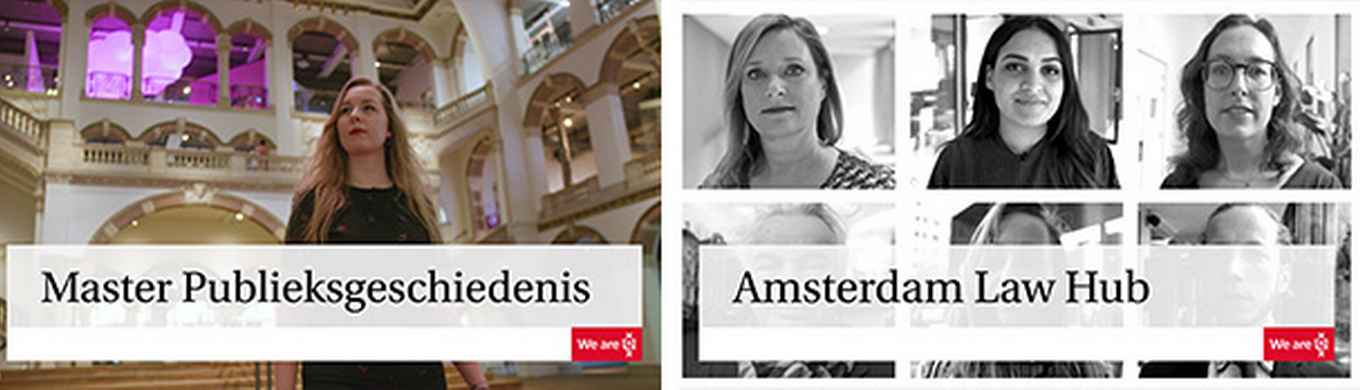
Example thumbnail Subtitles
Videos should have English or Dutch subtitles, depending on the spoken language in the video. Do not add subtitles directly to the video; instead, upload them as a separate SRT file. This allows viewers to turn subtitles on or off in YouTube or Vimeo.
YouTube targeting
To improve the discoverability of a video published on YouTube, it is important to add tags. General examples include: Amsterdam, UvA, University of Amsterdam, faculty name, degree programme, field of study, relevant professions, etc.
Video title and description
A good title and clear description are also important for making a video easier to find online. Match the language of the title and description to the spoken language of the video. YouTube displays titles over two lines on overview pages, so keep titles short and concise, with a maximum of 30–35 characters.
For the video description, include a brief description of the degree programme, for example, or a concise summary of the video's key message. Always end the description with a link to a relevant page on uva.nl and/or relevant social media channels.